No app store. No account.
Lynn’s Library, on your home screen.
The shelf, the Reading Room, and everywhere you leave a verdict — one tap, no app store, no account.
It installs from your browser in about five seconds and takes almost no space. Nothing to sign up for. Your verdicts stay yours.
Current Books
Open ShelfLoading…
Reading Room
Join inLoading…
Shows
See all LL
LL V
VAdd it from your browser
Add Lynn’s Library to your phone — no app store, no account. Use the button below, or follow the steps for this device.
Get Lynn’s Library
Put the Shelf, the Reading Room and Bring a Book on your phone.
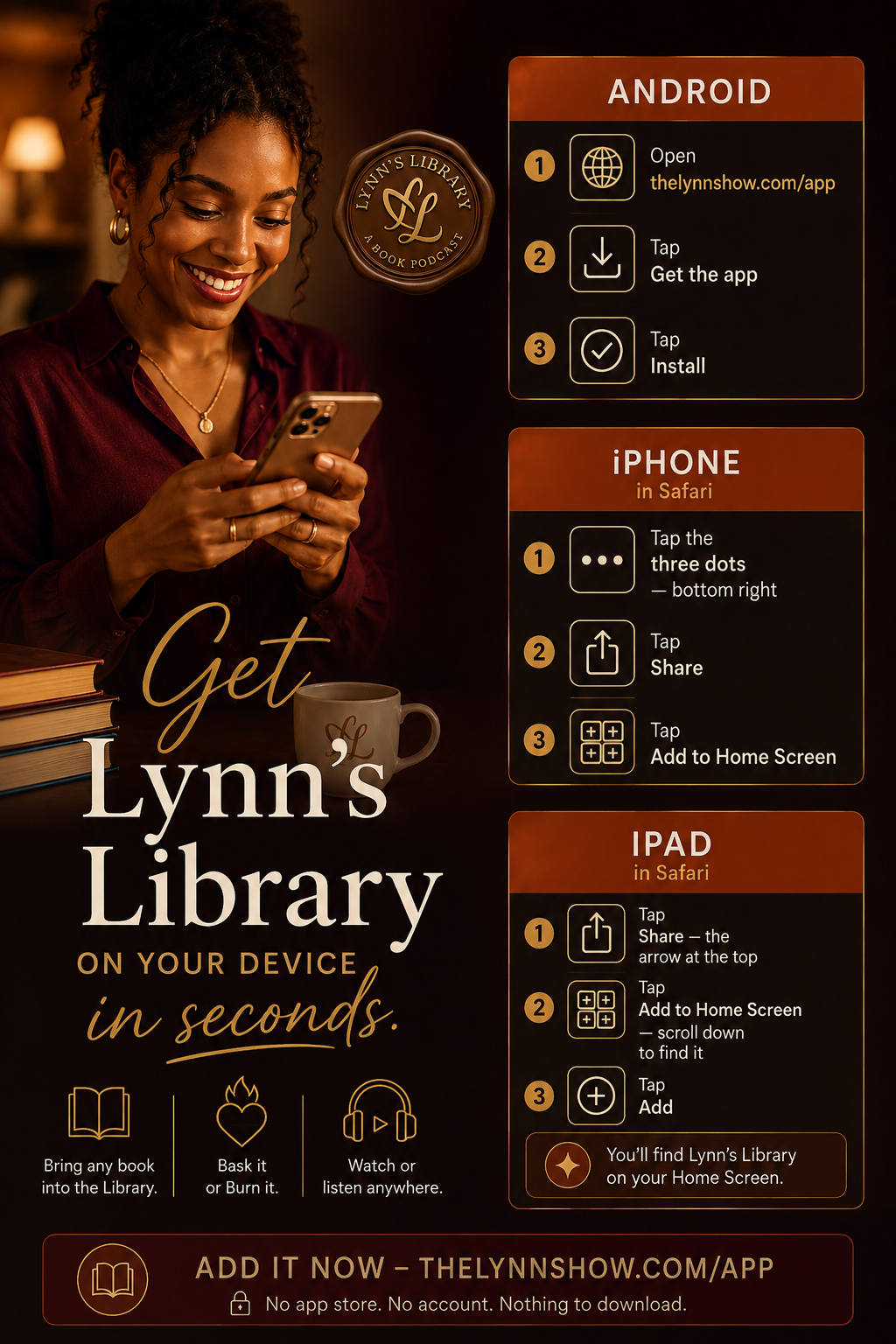
Tap to open it full size, save it, or send it on.
Add Lynn’s Library
On iPhone, Apple does not allow a one-tap install. Use Safari, then Share and Add to Home Screen.
- Tap the three dotsIn Safari.
- Tap Share
- Tap Add to Home Screen
Adding it to your device doesn’t sign you up for email and doesn’t create an account.